
EOL transition guide · Published
Evaluating Micron 3500 SSDs for a Micron 3400 Application
Configuration, host, and qualification checks when considering a Micron 3500 SSD for an existing Micron 3400 application.
On this page
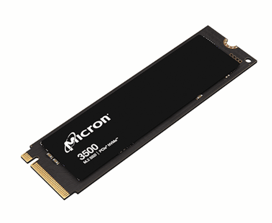
If you are considering a Micron 3500 SSD for an existing 3400 application, start with the complete part number and host requirements. We can help review options and arrange samples for your team to evaluate.
The full 3500 specifications are on the Micron 3500 product page and in the current product brief.
Micron 3400 and 3500 at a Glance
| Feature | Micron 3400 | Micron 3500 |
|---|---|---|
| Intended use | Performance client systems | Performance PCs and notebooks |
| Form factor | M.2 2280 | M.2 2280 |
| Interface | PCIe Gen4, NVMe | PCIe Gen4, NVMe 2.0c |
| Capacities | 512GB, 1TB, 2TB | 512GB, 1TB, 2TB |
| Maximum sequential read | Up to 6,600 MB/s | Up to 7,000 MB/s |
| Maximum sequential write | Up to 5,000 MB/s | Up to 7,000 MB/s |
| Maximum random read | Up to 720 KIOPS | Up to 1,150 KIOPS |
| Maximum random write | Up to 700 KIOPS | Up to 1,150 KIOPS |
| Security configurations | TCG Pyrite and TCG Opal options | TCG Pyrite and TCG Opal options |
Maximum performance varies by capacity and test condition. Use the specification for the exact drive capacity under review.
What Changes in the 3500
The 3500 moves to Micron 232-layer TLC NAND and updates the NVMe revision while keeping a PCIe Gen4 M.2 2280 client-drive format. Micron positions it for demanding client applications such as professional and scientific computing, content creation, and gaming.
Check firmware, power, cooling, security configuration, and host support even when the form factor and interface match. Have the responsible engineering team approve reuse of the system image and qualification record.
Starting Part-Number Cross-Reference
These pairings align by capacity and security type. Confirm current production status, packaging codes, and the complete replacement MPN before ordering.
| Micron 3400 | Micron 3500 candidate | Capacity | Security |
|---|---|---|---|
| MTFDKBA1T0TFH-1BC15ABYY | MTFDKBA1T0TGD-1BK15ABYY | 1TB | SED / TCG Opal |
| MTFDKBA1T0TFH-1BC1AABYY | MTFDKBA1T0TGD-1BK1AABYY | 1TB | Non-SED / TCG Pyrite |
| MTFDKBA2T0TFH-1BC15ABYY | MTFDKBA2T0TGD-1BK15ABYY | 2TB | SED / TCG Opal |
| MTFDKBA2T0TFH-1BC1AABYY | MTFDKBA2T0TGD-1BK1AABYY | 2TB | Non-SED / TCG Pyrite |
| MTFDKBA512TFH-1BC15ABYY | MTFDKBA512TGD-1BK15ABYY | 512GB | SED / TCG Opal |
| MTFDKBA512TFH-1BC1AABYY | MTFDKBA512TGD-1BK1AABYY | 512GB | Non-SED / TCG Pyrite |
Qualification Checklist
- Confirm capacity, the complete manufacturer part number, security configuration, and packaging.
- Confirm BIOS, NVMe driver, firmware-management, and sanitize support.
- Check component height, retention, heat spreading, and available airflow.
- Test production workloads, power states, thermal throttling, and recovery behavior.
- Record the approved MPN and firmware revision in controlled program documentation.
Send us the existing 3400 part number and host platform, and our team can help confirm the 3500 configuration to evaluate.